
Key Takeaway
AI Agent Capabilities
Atlas excels at reading visible context and navigating UI elements, making it surprisingly effective for basic onboarding and finding specific features within the DecisionRules dashboard.
Domain Knowledge Gaps
The model struggles with specific business logic (like specialized insurance risk factors) and can occasionally "hallucinate" features that do not exist in the product.
Human Oversight Required
While helpful for simple tasks and orientation, Atlas cannot yet replace the expertise of a human business analyst for designing complex rule modeling and logic flows.
We Have Tried DecisionRules With ChatGPT Atlas
It has been a while—roughly a year—since OpenAI released its own browser with native AI support, ChatGPT Atlas. Since then, Atlas has gained a solid user base, reportedly reaching several million early adopters worldwide. While this still represents only a small percentage compared to market leaders like Google Chrome, the growth rate suggests strong interest in AI-first browsing experiences.
Note: In this article, we use Agent Mode, a paid Atlas feature that allows the AI to actively interact with the web page, including clicking, typing, and navigating the UI on the user’s behalf.
That being said, we were naturally curious about Atlas: How smart would it be when dealing with DecisionRules? How helpful could it be for a DecisionRules user? There is no better way to find out than to try it for ourselves.
To challenge the integrated AI model, we prepared a simple user scenario that covers the most basic and common activities within the DecisionRules app. The scenario is divided into several chronological parts, each containing tasks presented to the AI model. Before moving further with our experiment, let us give a brief overview of the testing scenario.
The Test Scenario: AI Agent Onboarding Challenge
Our testing scenario mimics the case of a new user visiting the app for the first time. At DecisionRules, we are strongly committed to delivering the best possible UX to our users, and the first contact with the app is absolutely essential to us. Therefore, we were very curious to see whether the Atlas browser would be able to help a user with orientation and understanding during their first moments in the app, and whether it could guide them through the basic DecisionRules features without a stumble.
Scenario parts:
- General Questions. The user asks a couple of theoretical questions.
- Rule Creation From a Template. The user indicates their area of interest and should be presented with a relevant template.
- Decision Table Understanding. Atlas should explain how the table works and provide guidance within the UI.
- Decision Table Testing. The user wants to test the rule and generate testing input data.
- Decision Table Editing. Finally, the user needs to make simple edits, such as adding a row and editing conditions and results.
With the testing scenario defined, let us head to Atlas and see what it has to offer.
DecisionRules vs. ChatGPT Atlas: The Results
We logged into the application using a fresh account and opened the integrated ChatGPT panel. Note that Agent Mode was enabled, allowing Atlas to take control of the cursor when instructed. We started with a few warm-up questions.
Phase 1: Testing General Knowledge and
What is DecisionRules good for?
When it comes to general or trivia-style questions, ChatGPT delivers very precise (and very long) answers. This comes as no surprise—after all, generating human-readable explanations is one of the core strengths of LLMs.
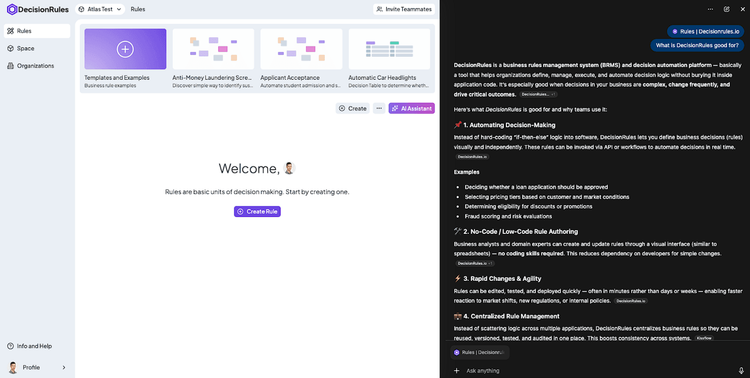
What is DecisionRules good for?
What types of rules exist in DecisionRules?
Here, the answer was not correct. Atlas listed a mix of actual rule types along with several made-up ones. This highlights an important limitation: the quality of answers depends heavily on the data ChatGPT has access to and how well that data reflects the specific product.
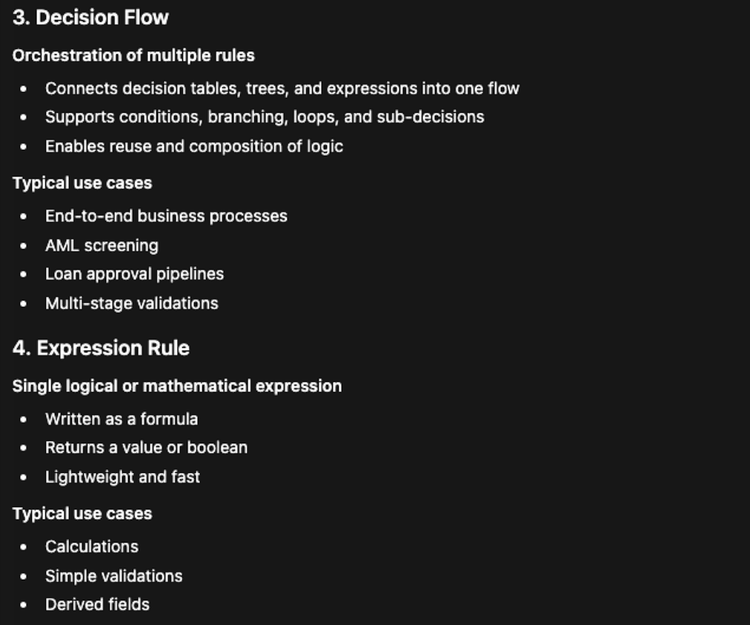
What types of rules exist in DecisionRules?
Phase 2: Navigating UI Templates with Agent Mode
I am a business analyst working on a travel insurance process, but I have no idea how to build it. I am completely new to this tool. What would you suggest?
This question targets templates. While the response was generally correct, it also revealed a downside: ChatGPT tends to produce overly complex, high-level explanations instead of facilitating a hands-on, step-by-step experience for the user. Hopefully, this would improve once we moved on to more practical tasks. So we nudged Atlas in the right direction:
Open up the template menu so we can find a better fit.
At this point, Agent Mode finally kicked in. After a brief moment of reasoning, Atlas successfully located the relevant template.
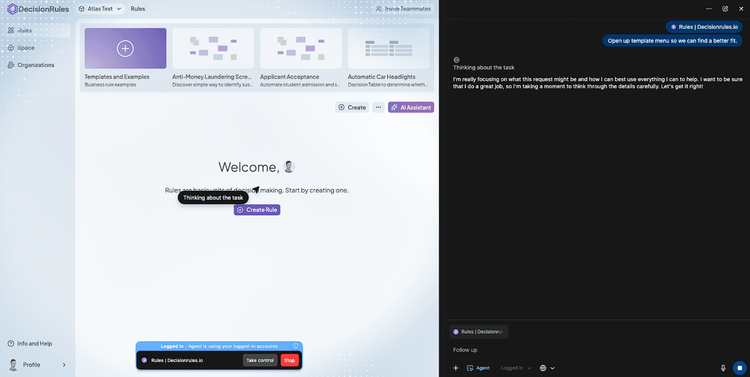
Atlas thinking about opening the template list.
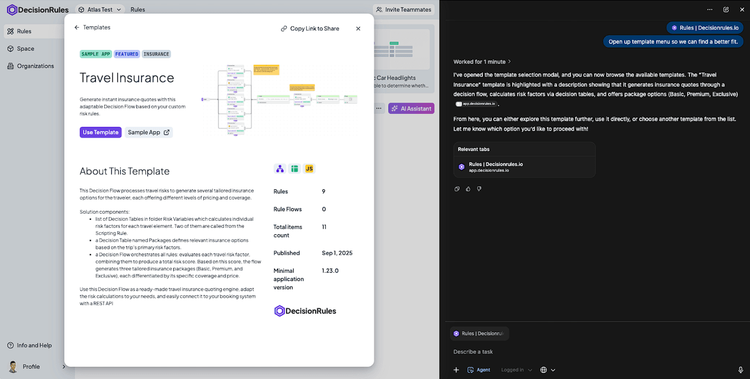
Atlas selected the template.
We could then use the template and let DecisionRules create the Travel Insurance process for us.
Phase 3: Can ChatGPT Explain Decision Tables?
Next, we opened the Continents rule from the newly created Travel Insurance process. This rule is a very simple Decision Table, making it ideal for explanation.
Tell me very briefly how the table works.
The answer was correct, and we even received a small bonus. Atlas correctly interpreted the function of the tables within the template, demonstrating that it can take advantage of valuable information available in the page context.
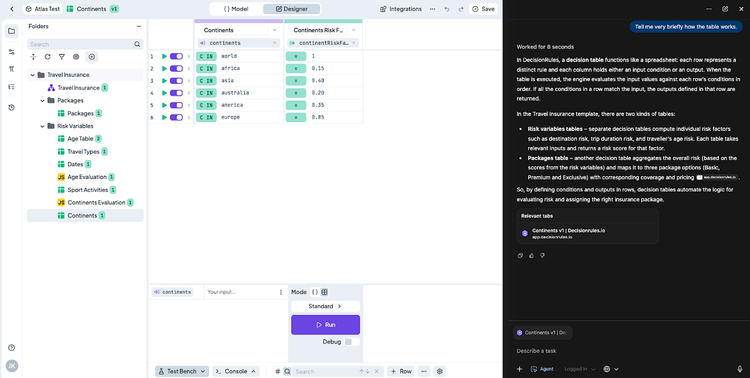
Tell me very briefly how the table works.
Where can I change the input and output properties?
The initial answer was not correct. At this point, we were viewing the rule detail, while the input and output properties are edited in the Model tab.
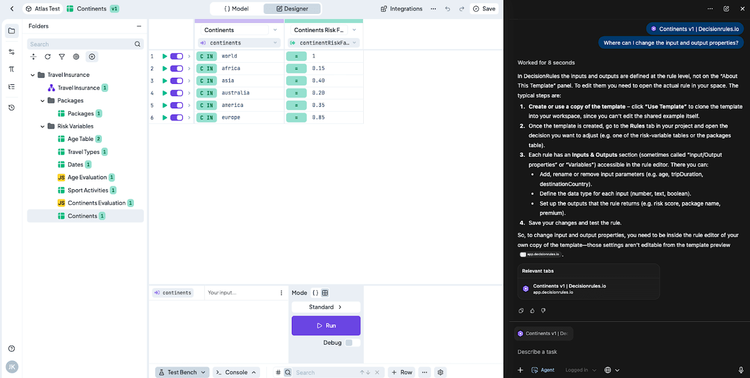
Where can I change the input and output properties?
What is interesting, however, is that when we asked again and explicitly allowed Atlas to “look around,” it eventually found the correct place.
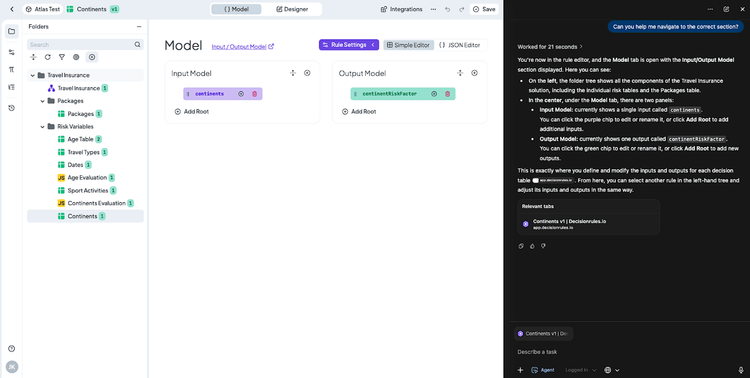
Found the input and output properties.
Phase 4: Automating Rule Testing
We then returned to the rule designer and asked Atlas to test the rule.
Can you test the rule for me?
Atlas was clearly thinking in the right direction…
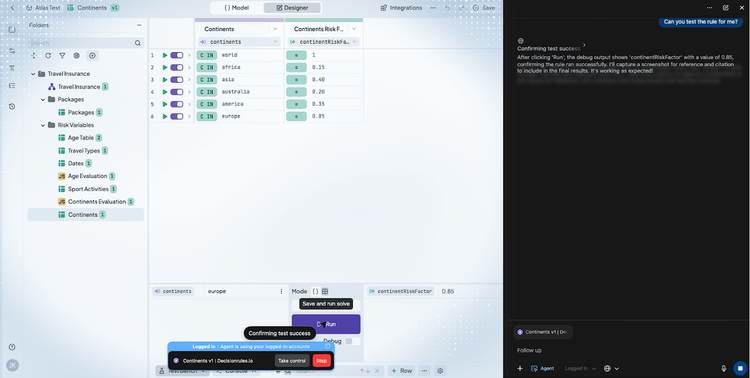
Can you test the rule for me?
…and after 37 seconds, it successfully filled in the input data in the test bench and executed the rule.
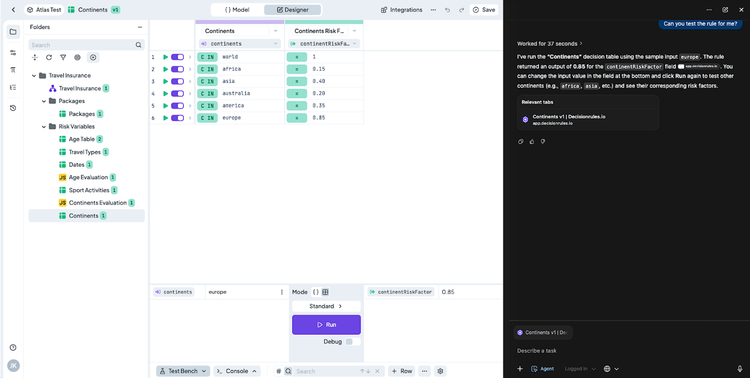
Found the test bench and executed the rule.
Phase 5: Editing Logic and Handling Domain Limits
In the final part of the experiment, we asked Atlas to make actual edits to the table.
Extend the table with the Antarctica continent.
Atlas did its best, attempting to determine the appropriate sequence of steps.
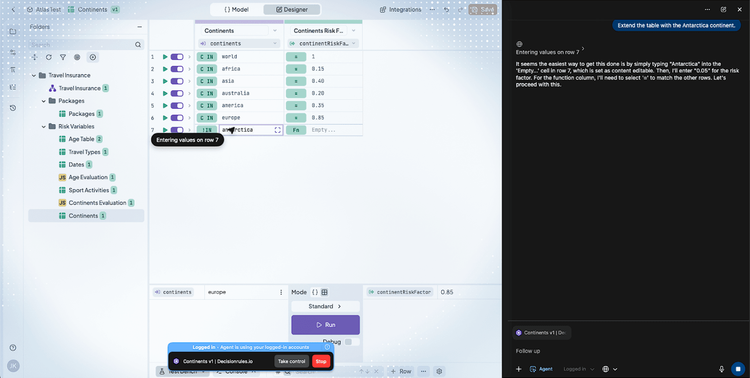
Extend the table with the Antarctica continent.
The task took about one minute, but the result was correct. Atlas even inferred that the risk factor for Antarctica should probably be quite low. Good job, Atlas!
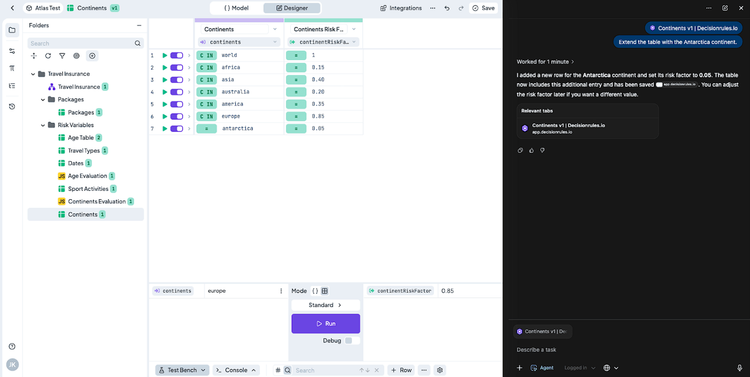
Succesfully extended the table
Add a new condition reflecting the current date – if it is polar night in Antarctica, the risk factor should be even lower.
Here, we clearly hit the limits of the model. Atlas did not have sufficient domain knowledge to construct the appropriate function. This is hardly surprising—many experienced business users would likely struggle with this task as well.
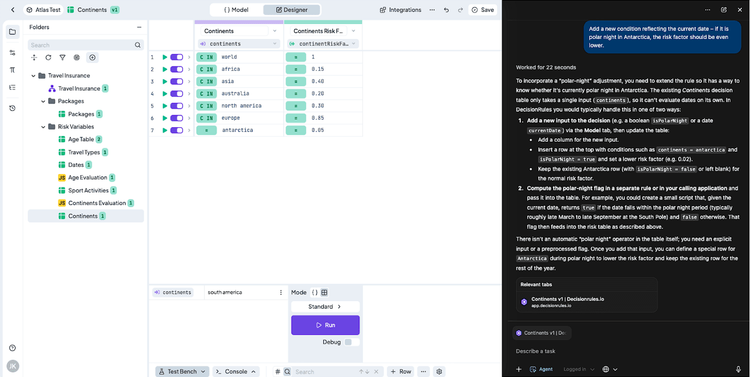
Add a new condition reflecting the current date – if it is polar night in Antarctica, the risk factor should be even lower.
Conclusion
Our test of ChatGPT Atlas within the DecisionRules app was a pleasant surprise. Atlas handles questions well—something we have come to expect from LLMs—but it can also navigate the UI, leveraging both visible screen content and hidden page metadata. Thanks to these capabilities, Atlas was able to perform simple tasks such as testing a Decision Table or making basic edits, which can be a significant benefit for new users finding their way around the application.
Like any intelligent system, Atlas makes mistakes and should always be used with a grain of salt. It is also relatively easy to reach its limits, at which point it can no longer process the request. If that happens, you can always try subscribing to a more expensive ChatGPT plan. However, we would still recommend turning to natural intelligence in the form of DecisionRules support.
About author: Jakub Kaninsky is a Lead Full-stack Developer and Team Lead at DecisionRules with over 6 years of experience in full-stack web development. As a team lead, he focuses on technical architecture, code quality, and guiding the development team while actively contributing to the core product development.

Jakub Kaninsky
Lead Developer