AI Agent
The first rule type that thinks.
A native rule type that reads, reasons, and returns structured data. Not a chatbot. Not an integration. Built directly into the engine that runs your business.
Reasoning, Not Just Matching
Decision Tables match conditions. AI Agent understands context. It reads what no other rule type can: documents, narratives, signals. And turns them into structured output your rules can act on.
Structured, Typed, Reliable
You define the schema. AI Agent fills it. Whatever role it plays, the result is always typed, always structured, always ready for the next rule downstream.
Inside The Engine
Same editor. Same Flow integration. AI Agent is not bolted on, it is built in. It thinks where your rules already live.
From Conversation to Recommendation
AI Agent extracts the client profile from a natural conversation. Deterministic rules then create a consistent and auditable investment shortlist.
- Structured data from free-form conversations
- Warnings when important information is missing
- Consistent recommendations based on deterministic rules
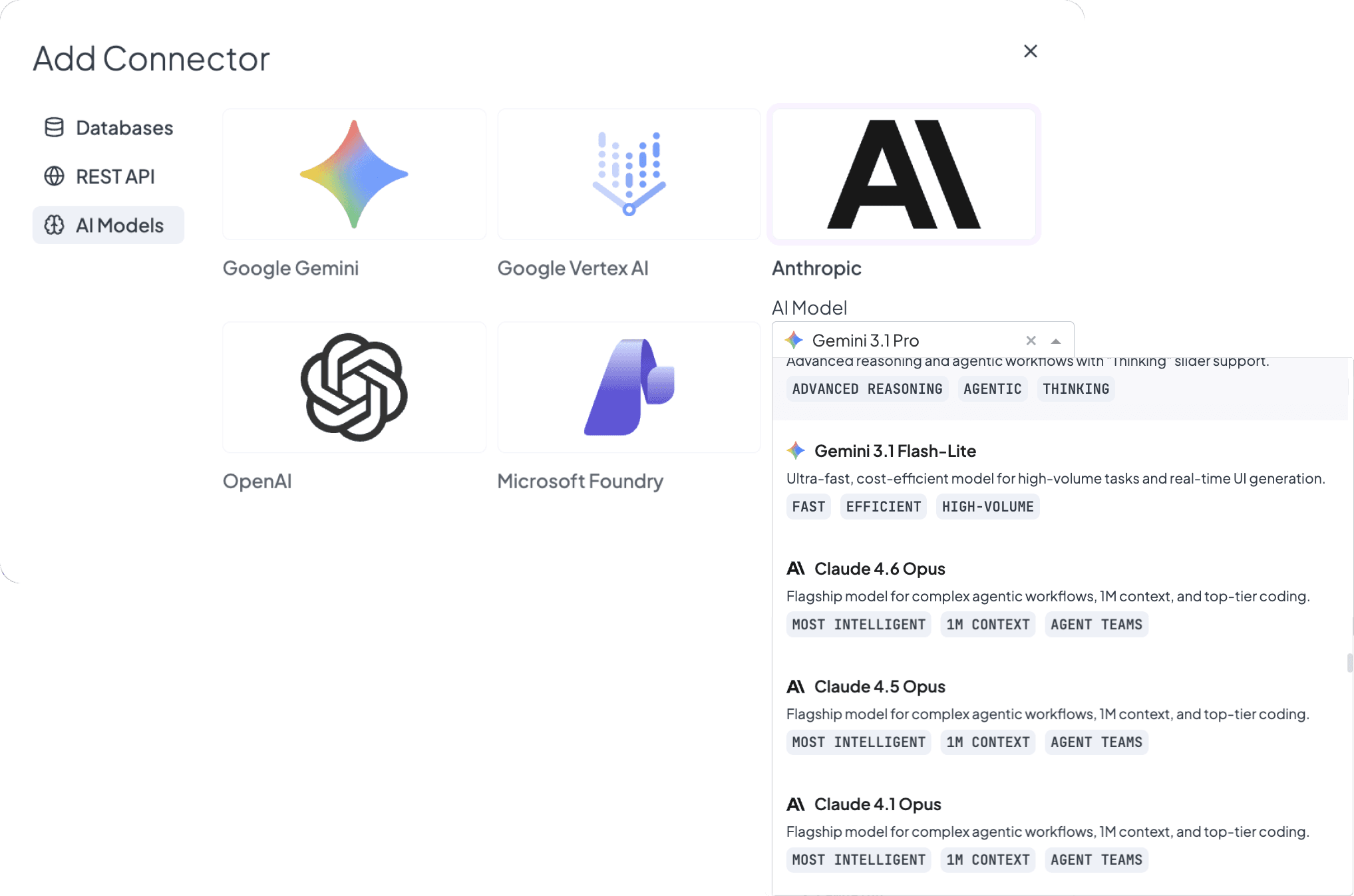
Choose Your Own AI Model
AI Agent isn't locked to one provider. Connect Google Gemini, OpenAI, Anthropic, Google Vertex AI, or Microsoft Foundry. Whichever model your team already uses, already trusts, or already pays for.
- Switch models independently per rule
- Connect via the Connectors panel in seconds
- Swap models without touching your schema or your Flow
Show the Reason Behind It
Enable Explainable AI and every response comes with a confidence score, a plain-language reasoning paragraph. You see the answer and the thinking behind it.
- Confidence score per response
- Source fragments tied back to verbatim input text
- Warnings surface ambiguous or inferred extractions automatically
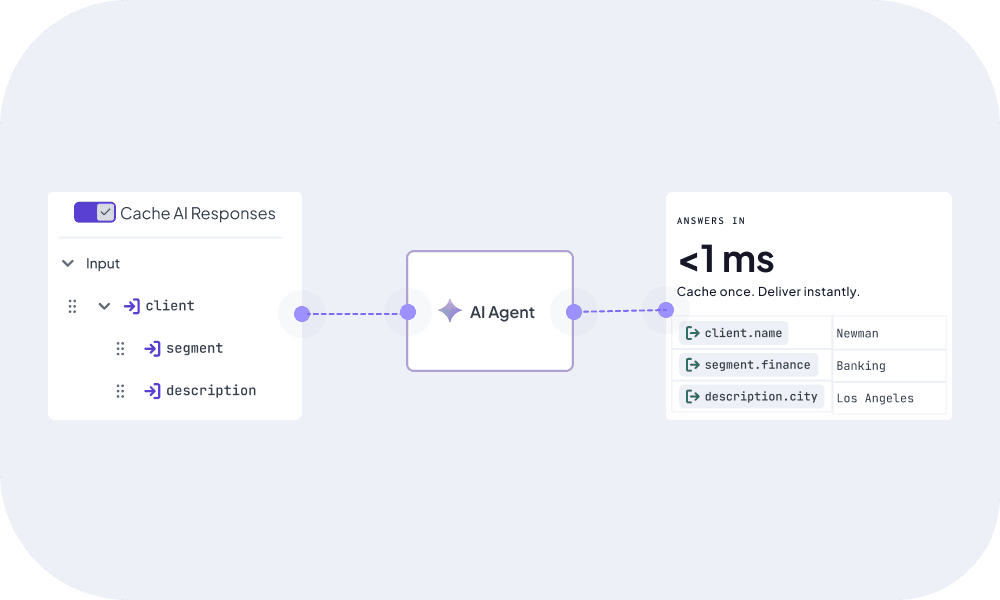
Cut Tokens with Caching
Enable caching and identical inputs return the same result instantly - without calling the model. For high-volume workflows where inputs repeat, this cuts cost and latency without changing a single line of logic.
- Toggle per rule, no infrastructure required
- Cache window that matches your data freshness needs
Reason Against Documents
Attach a document directly to the rule — a compliance policy, a pricing guide, a product manual — and the AI uses it as live context when making its decision. Just attach and run.
- Policies, guidelines, reference documents as rule input
- AI reasons against the attached document per call
- Combine with structured fields for full context
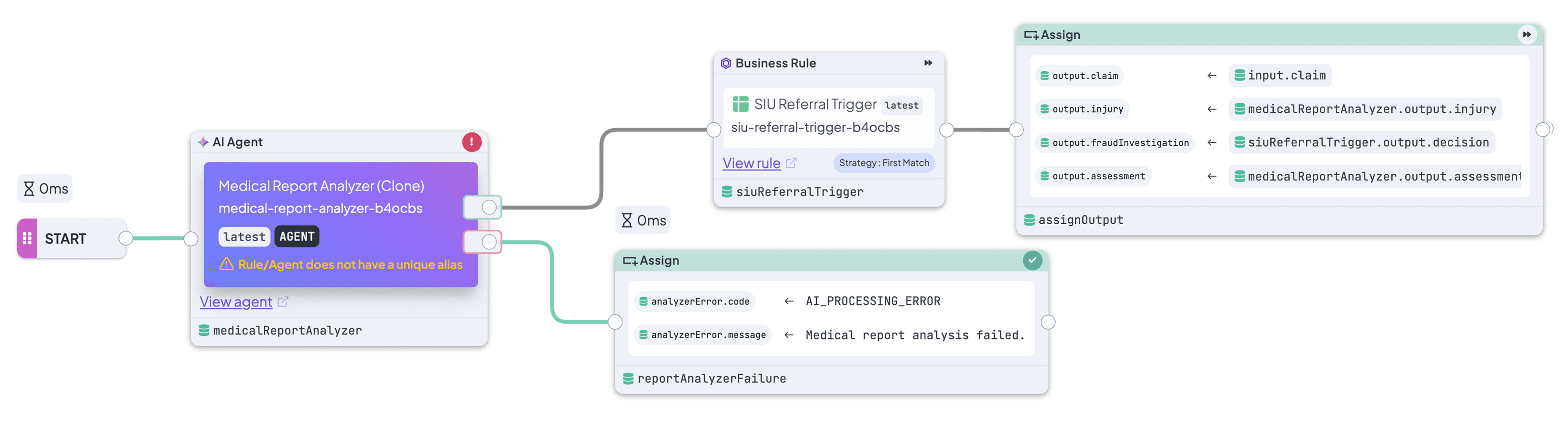
Keep Flows Running
Models fail. It happens. But in a live business process, “the AI returned an error“ can't mean “the whole thing stopped“. Every AI Agent node has a dedicated error output — a second path that catches failures before they become problems. Route it to a fallback, flag it for review, assign a default value, and carry on.
- No silent failures, no broken processes, no manual cleanup
- Route errors to fallbacks, human queues, or notification logic
Enterprise Ready AI Rules
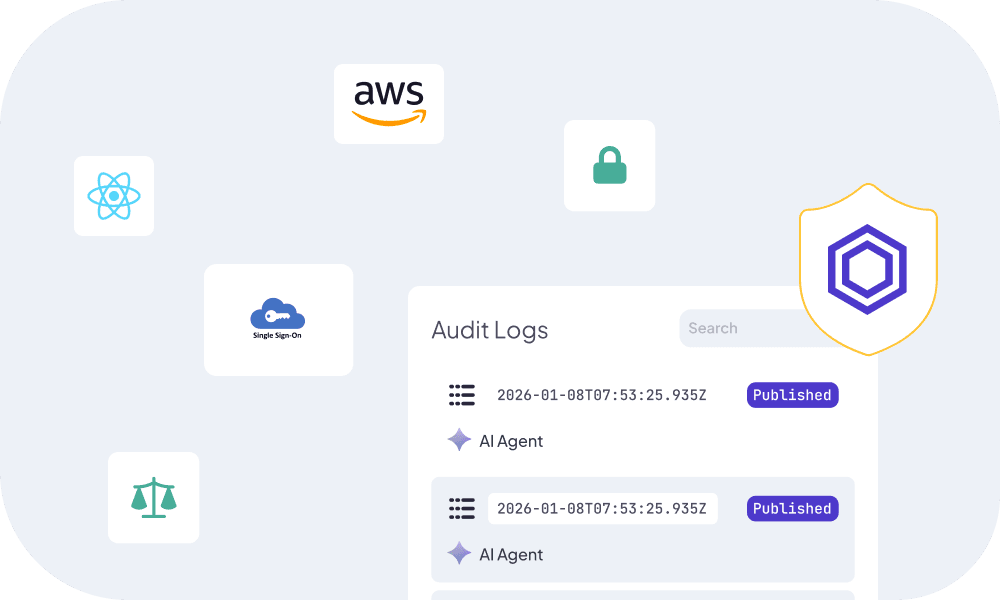
When you connect your own model, your data flows under your agreement with that provider — not ours. Pick a provider that fits your compliance posture — the security baseline stays the same.
- Your API key is encrypted and scoped to your Space only
- SOC 2 & ISO 27001 certified — regardless of which model you plug in
Frequently Asked Questions
Still have questions? We have answers.
Getting Started with AI Agent
What is an AI Agent in DecisionRules?
An AI Agent is a native rule type that uses a large language model to read, reason, and return structured data. You assign it a role, write a prompt that sets the context, define an output schema that controls exactly what comes back, and connect it to the model of your choice.
The result is always typed, always structured, and always ready to feed the next rule in your workspace: a Decision Table, a Flow, or another AI Agent.
When should I use an AI Agent?
Use an AI Agent when the task falls into one of three patterns.
First, extraction: turning unstructured input like contracts, reports, or emails into structured fields your rules can act on.
Second, routing and decisions: evaluating input and returning a score, a risk flag, or a routing outcome that doesn't reduce to a clean set of conditions.
Third, analysis and narrative: summarising complex data, writing a decision rationale, or producing a report, either mid-Flow or at the end once all other rules have run and their outputs are available.
How is AI Agent different from a Decision Table or Scripting Rule?
Decision Tables match conditions against structured input and return a defined output. Scripting Rules compute and transform data using code. AI Agent does something neither can: it interprets. It reads unstructured input, understands context, and extracts meaning.
The most common pattern is to use all three together: AI Agent reads the raw input and produces structured data, a Decision Table evaluates that data, and a Scripting Rule handles any calculation on top.
What does a typical AI Agent setup look like?
The key principle: each AI Agent should do one job. Don't ask a single agent to read a document, score risk, summarize findings, and route the case: that's four jobs. Split them into focused agents, each doing one thing well.
One real pattern for Workers' Compensation Claims:
A medical report arrives, the AI Agent's only job is extraction, it reads the report and outputs structured fields: injury type, affected body part, estimated recovery weeks, work capability.
From there, the rules engine takes over with clean, typed data. A Decision Table routes by severity, another validates coverage, the next calculates the reserve amount.
Try this template.
Is AI Agent the same as the AI Assistant?
No. They solve different problems. AI Agent is a rule type that processes production data at runtime: it reads unstructured input, reasons over it, and returns structured output inside your Decision Flows.
AI Assistant is a workspace helper that lives in the editor: it helps you build rules, generate test data, write functions, and understand existing logic. One runs your decisions. The other helps you build them.
Learn more about AI Assistant
Do I need AI or prompt engineering experience to use it?
No. AI Agent is schema-first, the output schema does most of the work. The prompt sets role and context in plain language; the schema controls what comes back. If you can describe the task in a sentence and name the fields you need, you have everything required to build an AI Agent.
Models and Connectors
Which AI models can I connect?
Google Gemini, Google Vertex AI, Anthropic, OpenAI, and Microsoft Foundry. Connect any of them via the Connectors panel and assign them to individual AI Agents. New model providers are added regularly, check the Connectors panel for the current list.
See our documentation for the full setup guide.
Can I use different models for different rules?
Yes. Each AI Agent is connected to a specific model independently. One rule can run on Gemini, another on Claude, another on GPT-4, all within the same workspace.
This lets you match the model to the task: a fast, cheap model for high-volume extraction, a more capable one for complex reasoning.
What if I already have an enterprise agreement with OpenAI or Google?
You can connect your own API key or enterprise endpoint through the Connectors panel. DecisionRules doesn't require you to go through a proprietary model layer: you bring your own connection and your own agreement.
Your existing pricing, usage terms, and data processing agreements with the provider remain in effect.
Who controls the model — DecisionRules or me?
You do. DecisionRules provides the rule framework, the schema engine, the versioning, and the Flow integration. The model connection is yours: your key, your provider, your contract.
DecisionRules never proxies your model calls through its own infrastructure.
Output Schema and Reliability
How do I define what the AI returns?
Directly in the AI Agent editor. Add fields, set their type: string, number, boolean or automatic. Write an annotation that describes what the field contains and how it should be determined. The schema is what controls extraction quality. Precise, specific annotations consistently outperform vague ones. Think of each annotation as an instruction to a careful analyst, not a label on a column.
What happens if a required field can't be extracted?
What the model returns when it can't determine a value is entirely up to you, and you define that in the prompt. Null is a common choice because it's easy to check downstream. But depending on your use case, returning "N/A", "unknown", or a domain-specific fallback may be more meaningful.
Whatever you choose, be explicit about it in the prompt and stay consistent, your downstream Decision Tables need to know what to expect when a field couldn't be filled with confidence.
How consistent is the output across repeated calls?
Very consistent for well-defined schemas with precise annotations. AI Agent is designed for typed extraction, the schema acts as a contract between your prompt and the model. That said, LLMs are probabilistic by nature. For maximum consistency, use specific field types, restrict values with enums where possible.
Can I use enums to restrict what values the AI can return?
Yes. Define the allowed values in the field annotation, for example, Allowed values: litigation · arbitration · mediation · negotiation, and the model will only return one of those values. This is the most reliable way to ensure downstream rules receive predictable, matchable output.
Caching & Explainability
How does caching work?
When caching is enabled, DecisionRules stores the result of each AI Agent call against a hash of the input. If the same input is received again within the cache window, the stored result is returned immediately: no model call, no token usage, no latency. The cache is per-rule and per-input. Change anything in the input and a fresh call is made.
Is Caching available on all plans?
Caching is available to try on the trial plan. For production use it must be included in your contract.
If you're unsure whether your plan covers it, check your subscription or reach out to our team via support.
What is Explainable AI and when should I turn it on?
Explainable AI adds a reasoning layer to every response. When enabled, each call returns a confidence score, a plain-language paragraph explaining how the output was reached, source fragments, the exact phrases from the input that drove each extracted value, and warnings for anything extracted with reduced certainty.
Turn it on when the rule's output will influence significant decisions, when you need an audit trail, or when you're still tuning the rule and want visibility into what the model is doing.
What does the confidence score actually measure?
It's the model's own assessment of how reliably it could extract the complete output: a number between 0 and 1. A high score means most fields were explicitly stated in the input. A lower score means more values were inferred, estimated, or drawn from ambiguous phrasing.
Use it as a signal, not a guarantee, a 0.95 doesn't mean the output is correct, it means the model was confident. Pair it with warnings to get the full picture.
Can I use source fragments as evidence in downstream logic?
Yes. Source fragments are returned as structured output alongside the main fields, they're part of the response, not a separate debug log. Their primary value is in auditing: instead of reading the entire input document to understand why a decision was made, an auditor can read only the exact phrases the model extracted.
Is Explainable AI available on all plans?
Explainable AI is available to try on the trial plan. For production use it must be included in your contract.
If you're unsure whether your plan covers it, check your subscription or reach out to our team via support.
Attachments
What kinds of documents can I attach?
Common document formats including PDF and others, check the documentation for the current list of supported types.
Use attachments for reference material that applies to every call: compliance policies, underwriting guidelines, product manuals, pricing rules, legal standards.
Is the attachment fixed per rule or dynamic per call?
Attachments are configured at the rule level, the same document is available to every call that rule processes. If the reference material changes, update the attachment and publish a new version of the rule.
How does attachment differ from passing text in the input model?
Input model fields are dynamic: they carry the data specific to each individual call, like a contract to review or a claim report to analyse. Attachments are static: they carry the reference context that applies to every call, like the underwriting guidelines the AI should reason against.
Cost and Performance
How do I control token usage?
Three levers: schema precision, caching, and model selection. A precise, focused schema with clear annotations produces shorter, more reliable outputs than a vague prompt that leaves the model to decide what to return: shorter outputs mean fewer tokens. Caching eliminates model calls entirely for repeated inputs. Choosing a smaller, faster model for high-volume extraction tasks can reduce per-call cost significantly without sacrificing quality for well-defined schemas.
Does caching count toward my model's usage limits?
No. A cached response is returned by DecisionRules without making a call to the model provider. Your model's API is never called for a cached result, so it doesn't count against your quota, rate limits, or billing.
Are there size limits on input text or attachments?
Yes, limits apply to both input size and attachment size and vary by model provider. Each provider sets its own context window, which caps the total amount of text the model can process in a single call. If your input or attachment exceeds the model's limit, the call will fail.
Check your model provider's documentation for current limits, and structure your inputs to stay well within them.
Versioning and Governance
Does AI Agent version the same way as other rules?
Yes, exactly the same. Every save is captured in Rule History and can be restored at any time. Versions are manual snapshots you create before significant changes: a prompt rewrite, a schema update, a model swap. You can roll back to any previous state in one click, and publish with the same confidence as any other rule in your workspace.
Can different Flows pin to different versions of the same AI Agent?
Yes. When you reference an AI Agent from a Flow, you can configure it to always use the latest published version, so a single publish propagates everywhere, or pin it to a specific version, so that Flow stays on a known state while you iterate.
Is there an audit log of AI Agent calls?
Yes. Enable the Audit Logs on any AI Agent and every call is recorded: input, output, timestamp or execution time. Use it for compliance, debugging, or building a record of AI-assisted decisions. When Explainable AI is also enabled, the audit log captures the full reasoning output alongside the structured result.
See our documentation on Audit Logs configuration for details.
Best Practices
What makes a good field annotation?
Specificity. "Duration of the initial contract term in months" consistently outperforms "contract duration." If a field has a fixed set of valid values, list them in the annotation. If it requires a judgement call or calculation, explain the logic. If the field could be confused with something similar, clarify the distinction.
The annotation is the instruction the model follows when filling that field, treat it like a brief to a careful analyst, not a label on a spreadsheet column.
How do I test an AI Agent before it goes to production?
Use the built-in Test Bench. Paste in a real sample input and run the rule directly in the editor, you'll see the full structured output and can inspect every extracted field before anything goes live. Once the rule is stable, build a Test Suite with a range of representative inputs and run it in one click after every change.
For fields where the output is a fixed value: a boolean or a number. You know exactly what a correct result looks like and can assert it directly. For fields that produce open-ended text: a summary, an analysis, a narrative. Mark them as ignored in the test so they don't block the run.
What's the right balance between prompt detail and schema precision?
Let the schema do the heavy lifting. A short, clear prompt: role, context, task. Combined with precise, well-annotated output fields consistently outperforms a long, elaborately engineered prompt with a vague schema.
The prompt tells the model who it is and what it's looking at. The schema tells it exactly what to return. If your output is inconsistent, the fix is almost always in the annotations, not the prompt.
Try for Free
Experience DecisionRules at no cost. A credit card is not required for the trial.
Start for freeContact Sales
Have questions? Our sales team is here to help you find the best solution for your business.
contact sales