Rule Comparison
See what changed. Before it goes live.
Every rule version tells a story. Rule Comparison shows you that story in one glance, so you know exactly what moved between versions without reading every cell by hand.
See changes instantly
Two versions, one view. The colours show you what was added, removed, or changed. No hunting, no guessing what your last edit touched.
Review before you publish
Worked on a new version for weeks? You do not have to remember what changed. Walk the differences, confirm the logic, then ship with confidence.
Speaks each rule's language
Tables, Trees, and Scripts each get a comparison built for them. You always see changes the way that rule actually looks.
Made for versions
Comparison is at its sharpest between two versions of the same rule. That is where it earns its place.
- See exactly what moved from v1 to v2
- Catch an accidental change before it ships
- Track how a production rule evolved over time
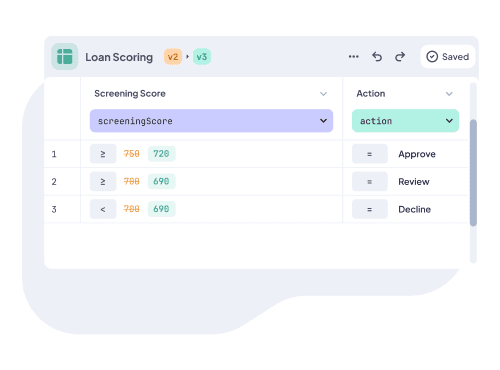
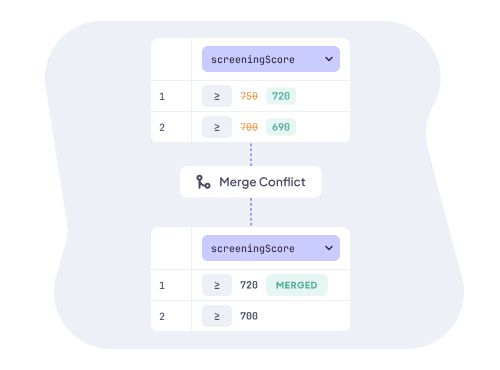
Fix it right here
No need to leave the comparison to act on what you found. Spot a difference, pull it in, move on.
- Adopt changes from the reference
- Add any missing value from the other version with one click
Never lose your place
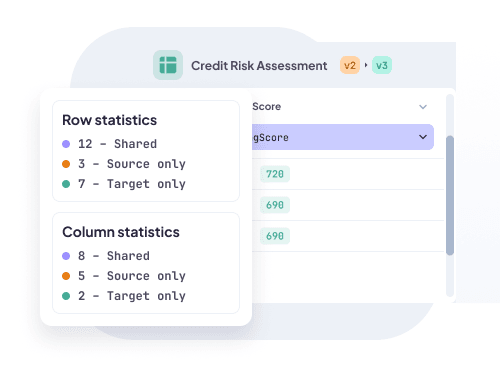
Big rule, dozens of changes? The comparison keeps you moving instead of scrolling.
- Instant count of changes
- Every change is highlighted, nothing slips past
- Get from first difference to last without hunting
Frequently Asked Questions
Still have questions? We have answers.
Getting Started
What is Rule Comparison?
It puts two rules side by side and colours every difference between them. It answers one question fast: what actually changed? It shines when you compare two versions of the same rule, like your live version against the new one you are preparing.
What do the colours actually mean?
Green is your rule, the one you have open. Blue is the version you compare against. Yellow means the row, column, or cell lives in both but changed. Anything with no color is identical. Learn it once and it works the same across tables and trees.
What do the statistics numbers mean?
A quick tally of the differences, counted separately for rows and columns. For each you see how many stayed the same and how many changed, split by colour.
Which rules can I compare against each other?
Same type only. Tables to Tables, Trees to Trees, Scripts to Scripts. That keeps the comparison meaningful, since a grid and a code file have nothing to line up against each other.
Best Practices
When does Rule Comparison work best?
When you compare two versions of the same rule. Comparing two unrelated rules works too, but nearly everything reads as different, so it is rarely helpful.
What is a good workflow before publishing?
Make it your final review step. Open the new version against the current live one, step through each difference, check the statistics for a quick count, and confirm every change is intentional. It turns "I think this is right" into "I can see exactly what I changed."
Try for Free
Experience DecisionRules at no cost. A credit card is not required for the trial.
Start for freeContact Sales
Have questions? Our sales team is here to help you find the best solution for your business.
contact sales