Loss Notice Validation
Validates FNOL, First Notice of Loss, and checks declared damages for property insurance.

DecisionRules
About the example:
Claim management is a critical aspect of the insurance business, beginning with the claimant's submission of the FNOL (First Notice of Loss).
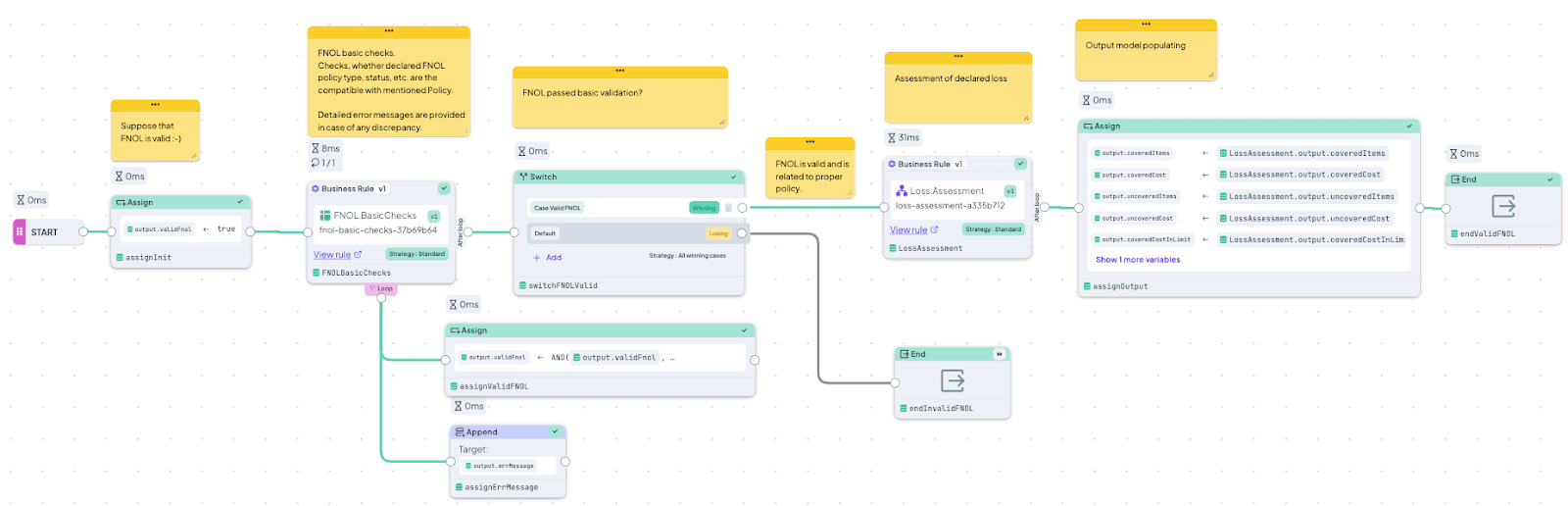
This example illustrates FNOL validation for Property Insurance in a two-step process:
- Step One: The FNOL is validated against the Policy.
- Step Two: The declared loss is assessed.
Solution Components:
- The Main Decision Flow, located in the Los Notice Validation folder, orchestrates all rules corresponding to this two-step process. The second rule is a nested Decision Flow.
- A Decision Table named Loss Notice BasicChecks verifies whether the declared FNOL corresponds to its Policy by checking factors such as Type and Status. It provides error messages if any discrepancies are found.
- A nested Decision Flow named Loss Assessment coordinates two additional rules within the Loss Assessment directory to evaluate the declared loss.
- The Decision Table Loss Checks classifies all declared damaged items into two lists based on whether the Policy covers each item.
- The Decision Table Loss CoveredLimit verifies whether the declared loss is covered within the policy limits.
You can use this Decision Flow as a ready-made FNOL assessment engine. Adapt the structure of all objects (e.g., Policy, FNOL, Coverage Product Risk Condition) as needed and seamlessly integrate them with your claim system via a REST API.
More Templates
See Other Templates
Property Insurance Pricing
Simple property insurance pricing model built with a Decision Flow and a couple of Decision Tables.
Anti-Money Laundering Screening (AML)
Discover simple way to identify suspicious transactions with this Decision Flow based on their characteristics.
Complementary Products
Automate "You might also like" recommendations with this Decision Flow based on an item in the user's shopping cart.